Background
Scenario: A lightweight ChatAgent embedded in a ChatGPT-style conversational interface, where users can engage in dialogue, document analysis, as well as other document generation and formatting tasks.
Note: This specific AIgent focuses on real-time conversation and analysis. This article does not cover RAG or long-term task planning.
Problems to solve:
-
- Design long- and short-term memory based on user intent analysis (intent router)
-
- Short-term memory design for follow-up questions triggered by quoting a text segment
-
-
Address shortcomings of long-term memory: (Who the user is, historical behavior, preferences, long-term goals) (system role personality, answer style)
-
Design Approach
-
- Design a conversation history database that saves every interaction with the ChatAgent as a complete data entry in real-time.
-
- Implement a user intent analyzer (intent router) to decide whether the LLM can directly answer using function calling, if short-term memory is needed, if long-term memory is needed, if file analysis should be triggered, or if the system role personality and answer style should be adjusted.
-
- Build an Agent that generates prompt tokens matching user demands for system role personality, answer style, etc., and writes or modifies
prompt_system.txtaccordingly. This allows the ChatAgent to dynamically adjust on each user reply.
- Build an Agent that generates prompt tokens matching user demands for system role personality, answer style, etc., and writes or modifies
-
- Based on user intent analysis, save dialogues involving file analysis into long-term memory.
-
- Under normal circumstances, save the user’s last 5 conversation turns as short-term memory, retrievable from the history database.
-
- When users quote a segment for follow-up, search the history database for the quote’s location and save the 3 conversation turns around that position as short-term memory.
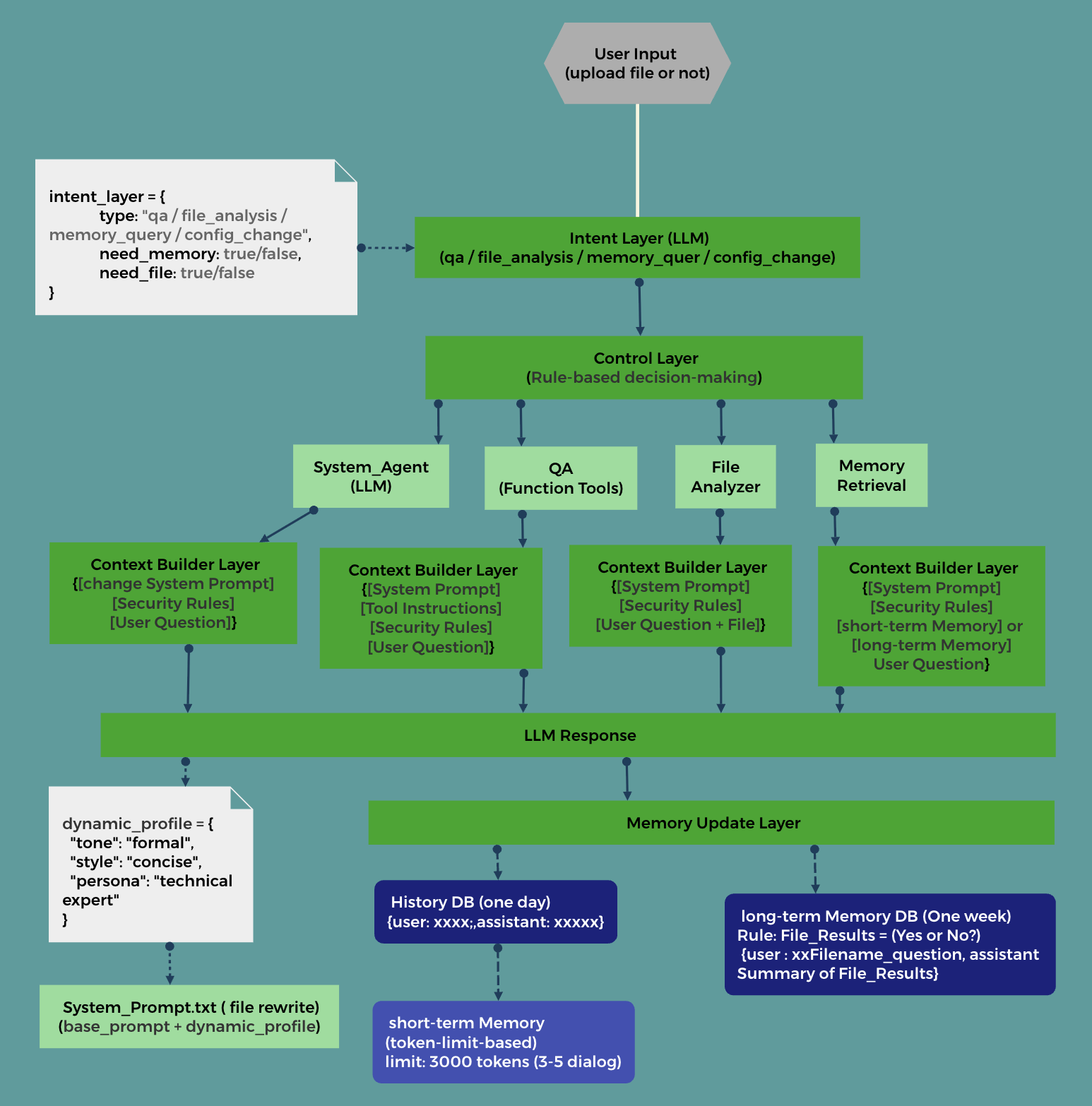
Architecture Diagram
Architecture Details
Intent Layer (LLM)
Use an LLM to analyze user input intent, categorized into: QA question, file analysis needed, memory query, system role configuration.
Structured output JSON:
intent_layer = {
	type: "qa / file_analysis / memory_query / config_change",
	need_memory: true/false,
	need_file: true/false
}
Control Layer
Rule-based decision making to invoke functional modules
Pseudocode:
intent = analyze_intent(user_input)

if intent["need_memory"]:
    memory = retrieve()

if intent["need_file"]:
    file = analyze()
......
QA questions:
Control whether to call tools, decide which tool to invoke, then:
-
- Use LLM + function calling to answer user queries.
-
- Use Tool Registry + rule matching (tool intent and user input) to select tools.
file_analysis
In OpenAI, files and user input can be directly passed as parameters to the API.
memory_query
Query long- and short-term memory modules.
- Typically, short-term memory covers the last 3-5 turns of conversation.
- When users quote text for follow-up, search the history database for the quote’s position → take 3 turns of context.
- The number of turns for short-term memory must observe token limits, e.g., tokens < 3000.
config_change System_Agent (LLM)
This involves calling a system Agent to extract personality traits, response style, etc., based on user requests and dynamically update the System_prompt part of the prompt tokens. System_Prompt = base_prompt + dynamic_profile.
LLM structured output JSON:
dynamic_profile = {
  "tone": "formal",
  "style": "concise",
  "persona": "technical expert"
}
Context Builder Layer
Manages prompt context, dynamically adjusting prompt structure and size to help reduce noise and save tokens in LLM calls.
Memory Update Layer
- Save user queries and LLM responses into the conversation history database.
- Save user summaries or file analysis results into the long-term memory database.
- Short-term memory is dynamically and temporarily retrieved from the conversation history database.
Improvements
- Upgrade the conversation history database to a vector database for faster retrieval. This also enables scalability to RAG.
- Add debug log outputs, for example:
【Intent】
Type: file_followup

【Memory Hit】
Hit: Record #23

【Context Used】
- Last 5 conversation turns
- File summary

【Final Answer Source】
Based on file content + historical questions
关于作者
我是Louis,一名长期从事iOS与AI相关工程实践的工程师,也是一个正在探索产品与商业可能性的准创始人.
这里的文章,更多是我在项目中用过,踩过坑,反复验证过的东西,而不是为了流量而写的“快内容”.
☕ 打赏
如果这篇文章对你有帮助,欢迎请我喝一杯咖啡☕️
GitHub Sponsors(推荐)You can support my work via PayPay by searching my PayPay ID:
PayPay ID: luochuan


你的支持会让我有更多时间,把真实项目中的经验持续整理和分享出来.
不打赏也完全没关系,感谢你读到这里.
联系与合作
如果你:
· 正在做iOS App / AI / 自动化相关的项目
· 对技术选型、架构设计、产品落地有困惑
· 或希望进行技术交流、合作探讨
欢迎通过以下邮箱联系我:
luochuanad@gmail.com